Customization, reorganised — and email templates you can now edit yourself
Everything that makes the platform look and feel like yours now lives in one place. Branding has moved up into a top-level Customization section in the sidebar, split into focused pages instead of one long settings screen — and email templates have moved from "send the change to our team and wait" to a page you edit yourself.
Branding now lives under Customization
Branding used to be tucked away inside settings. It is now the first item under Customization, a top-level section in the main navigation, with each area of customisation broken out as its own page — and Branding itself split into Visual Identity and Website Content tabs.
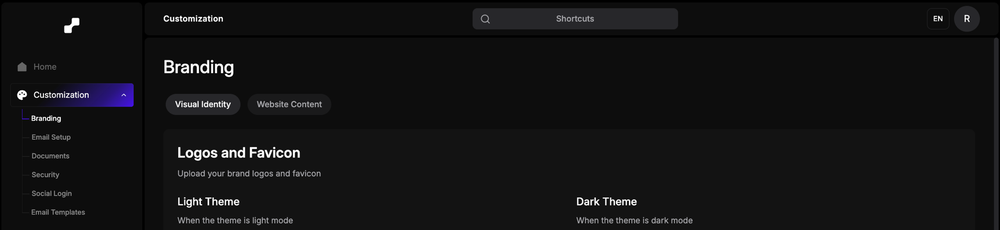
- Branding — logos, favicon, colours, and your website content.
- Email Setup — the sending domain and addresses your mail goes out from.
- Documents — the paperwork and agreements your artists see.
- Security — access and authentication controls.
- Social Login — which providers your users can sign in with.
- Email Templates — the wording of every automated email you send.
Edit your email templates directly
Previously, changing the copy in a transactional email meant sending the change over and waiting for our team to apply it manually. That round trip is gone. Email Templates lists every automated email — artist verification, KYC, payouts, permissions, infringement, QC — with its subject, status and last-updated date, and you edit them in place.
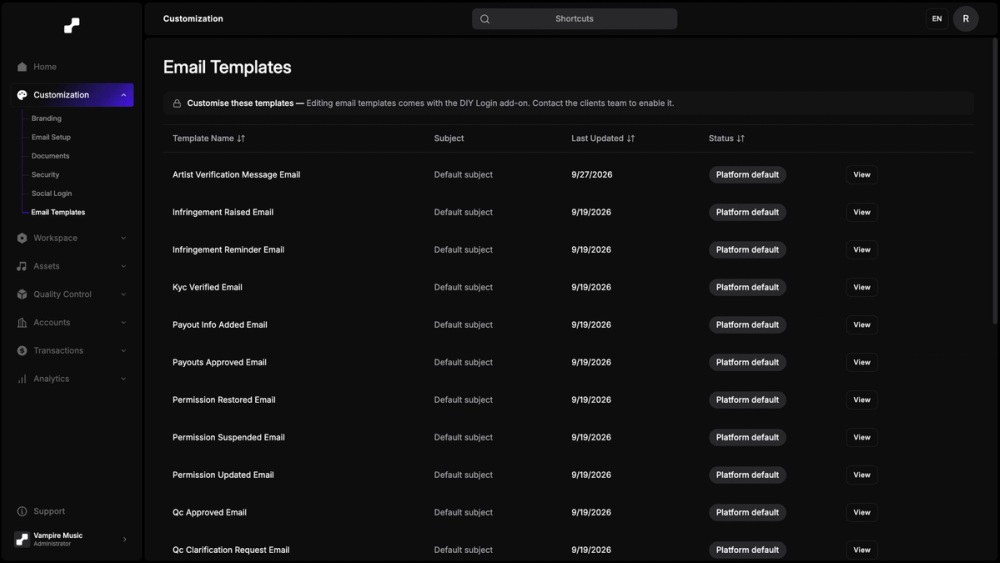
- Every template in one list, with its current status and when it last changed.
- Edit subject lines and body copy so each email reads in your own voice.
- Ship a fix the moment you spot a typo, instead of waiting on someone else’s queue.
Editing comes with the DIY Login add-on — contact the clients team once to enable it, and every change after that is yours to make.
Why it matters
Customisation should not depend on a support ticket. Between the new Customization section and editable email templates, the parts of the platform your artists actually see — the branding, the paperwork, the emails — are now yours to change whenever you need to.