Sign in with Google — Social Login is here
DW
Daniel Wright28 ก.ย. 2569
Passwords are the most common reason a new artist stalls at your front door — forgotten, reset, retyped. Social Login removes that step. Turn on Google Login and anyone you invite can sign in to your workspace with the Google account they already use.
Set it up in one page
Social Login sits under Customization in the sidebar, and it is yours to configure — no request, no waiting. You bring your own Google OAuth credentials, so the consent screen your users see carries your brand, not ours.
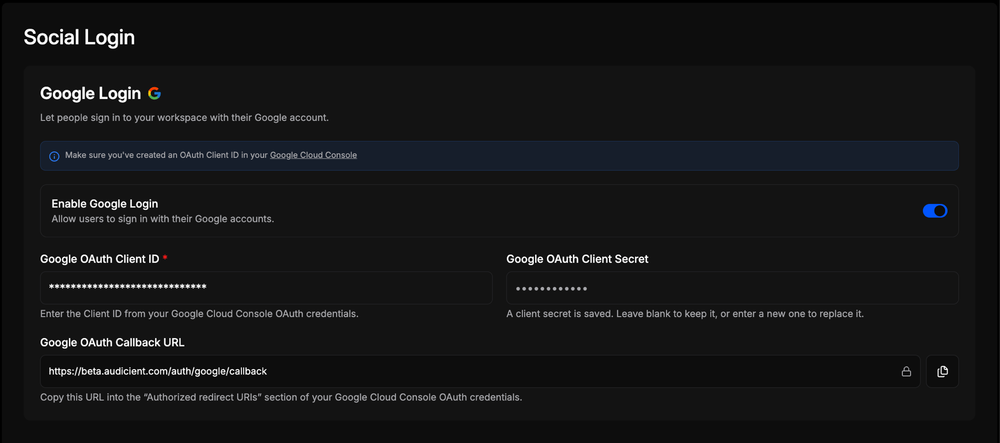
- Create an OAuth Client ID in your Google Cloud Console.
- Copy the callback URL from this page into the “Authorized redirect URIs” section of those credentials.
- Paste your Client ID and Client Secret, flip Enable Google Login, and save.
Built for real workspaces
- Your own OAuth app — your branding on the Google consent screen, your project in Google Cloud.
- The client secret is stored encrypted and never shown again; leave the field blank to keep it, or enter a new one to rotate it.
- The callback URL is generated for your workspace and copies in one click.
- Toggle it off at any time — email and password sign-in keeps working either way.
Why it matters
Fewer passwords means fewer reset emails, fewer support requests, and a faster first login for every artist you onboard. Google is the first provider on the page — more are on the way.